The Categories of AI-Assisted Development in 2026 / Aug 22, 2026

Someone tells you they built their app with AI. You now know almost nothing about what they did.
They might have typed one sentence into a builder and deployed whatever came out. They might have spent three weeks in an editor reviewing every diff. They might have briefed an agent from a terminal like a junior developer, or run four agents in parallel against a monorepo, or built the thing around an agent so the software itself calls models at runtime. Same sentence, six unrelated practices, wildly different consequences.
That confusion has a cost. It is why people argue about tools that were never competing, and why a founder who had a great weekend with a prompt-to-app builder is surprised when a contractor tells them month three will be expensive.
So here is a map. Last reviewed 22 August 2026.
The spine: who holds the codebase
Most attempts at this landscape are lists of tools, which date within weeks. A more useful organizing question is who holds the codebase.
In some categories there is no repository at all until the tool makes one, and the conventions inside it belong to the tool. In others you are the author and the model assists. In others you own the repository and delegate whole tasks into it. At the far end, you are building the AI system itself.
Order the categories by how much of the engineering you take on and you get a ladder. Note what that is not: it is not a ladder of delegation. Delegation is highest at the bottom, where you hand over everything and get an application back, and it drops sharply the moment you take ownership of a codebase. Which is exactly why the bottom rung feels so good and the step off it feels so bad.
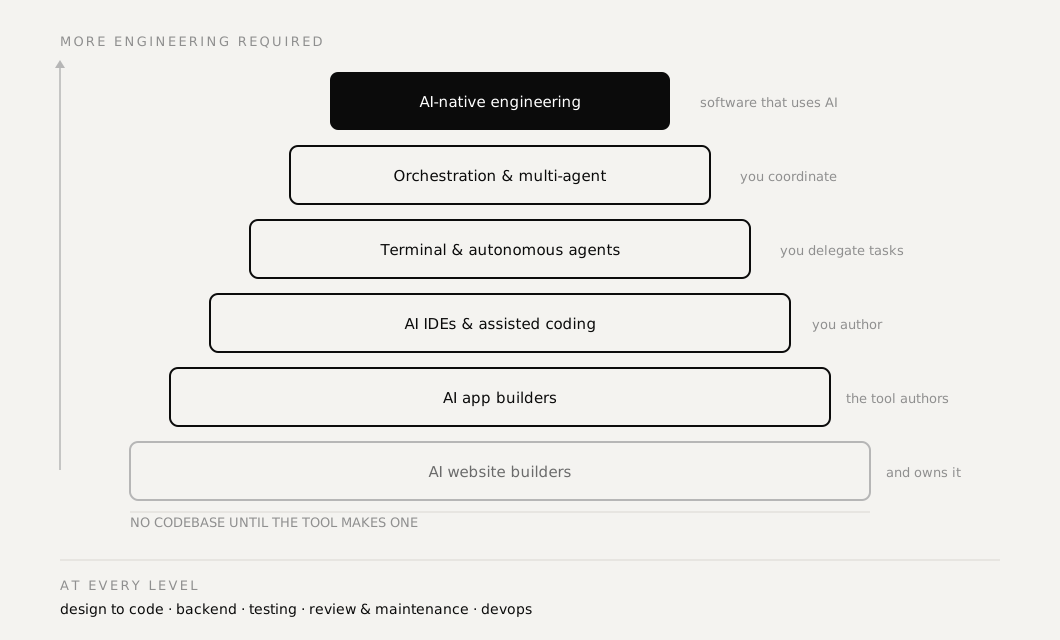
Higher is not better. It is more engineering required of you, and more that you own afterwards.
Where there is no codebase yet
AI website builders. Prompt to a marketing site or landing page. Portfolio, agency site, product page. The output is usually good and the ceiling is real: the moment you need behavior rather than pages, you are in a different category.
AI app builders. Describe an application, get a working one. Auth, a database, a deploy. This is the category that made vibe coding famous, and it genuinely compresses the first ninety minutes of a project into ninety seconds. It is also where the largest number of people get stuck, which I will come back to.
Screenshot to app. An image in, an interface out. Increasingly folded into the two above rather than a separate product.
What these three share: there was no repository until the tool made one, and the conventions in it are the tool's, not yours.
Where you hold the codebase
AI-assisted traditional coding. You are the engineer, the model is a pair. You ask for a pagination hook, you notice it does not handle race conditions, you say so, it fixes it. Unglamorous, and still the most common professional mode by a wide margin.
AI IDEs. The editor knows your whole codebase. Chat with the repository, agent mode for multi-file edits, indexed context, and a rules file that carries your conventions between sessions. The workflow is developer to AI to codebase to developer, which is not the same shape as prompt to application.
Voice and conversational coding. Speaking instead of typing. Genuinely useful for planning, where thinking outruns the keyboard, and important for anyone whose hands make sustained typing painful. Underserved and worth watching.
Where you delegate the work
Terminal-first agents. You brief an agent from the shell and it works inside your repository: inspect the project, implement, run the tests, fix what broke. It feels less like autocomplete and more like handing a task to someone competent who does not ask enough questions.
Autonomous coding agents. You give a goal, not a task. It plans, creates files, installs dependencies, runs tests, reads failures, tries again. When it works, it is startling. When it does not, you have a large diff and no memory of how it got there.
Cloud development environments. The work happens on someone else's machine, with no local setup. Often lumped in with the above because delegated agents increasingly run there. Worth its own line for one reason most write-ups miss: for a developer on a low-end laptop, a patchy connection or unreliable power, moving the environment off the machine is not a convenience, it is the thing that makes the work possible at all.
Where you coordinate
Multi-agent software engineering. Several agents with different roles, one on the frontend, one on the backend, one writing tests, sometimes a coordinator above them. Real, and further from routine than the marketing suggests.
AI-orchestrated development. You are the orchestrator. Plan in one model, design in Figma, implement in an editor, review with something else, deploy somewhere else again. Nobody chose this as an architecture. It emerged because different tools are genuinely better at different phases, and it is how most experienced people actually work now.
Both of these are coordination problems wearing engineering clothes. The hard part is not the tools, it is keeping a coherent intention across them.
Around all of it
These are not rungs on the ladder. They apply at every level.
Design to code. Figma or a mockup to components. Strongest when a design system already exists, weakest when it does not, because the tool will invent one.
AI backend and database builders. Schema, auth, APIs and rules from a description. Fast, and the place where damage compounds quietly, since a generated schema is much harder to walk back than a generated component.
AI testing and debugging. Test generation, stack trace analysis, reproduction, fixes. The most undersold category on the list. It is also the one that makes everything above it safer, which is why it deserves more attention than it gets.
AI code review, refactoring and maintenance. Understanding an existing codebase, finding technical debt, upgrading dependencies, documenting what nobody documented. Professional work is mostly not greenfield. It is maintaining something someone else built, and now some of that someone else is a model.
AI DevOps and cloud engineering. Containers, pipelines, infrastructure, monitoring. Moving from building it to running it.
Building software around AI
AI-native software engineering. The apex, and a different discipline rather than one more rung. Here you are not using AI to build software, you are building software that uses AI: model APIs, agents, retrieval, embeddings, tool calling, MCP, memory, model routing, evaluations, guardrails, observability and a security surface that did not exist five years ago.
Everything else on this list changes how you write software. This changes what the software is.
One category with an asterisk
Reverse engineering and cloning. Feeding a model a competitor's interface or observed behavior and asking for something equivalent. It exists, it is technically impressive, and the boundary between studying a pattern and copying a product is thinner than the people doing it usually admit. Learn from interfaces. Do not ship someone else's.
Where most people actually get stuck
Not at the bottom, and not at the top. At the seam between them.
The app builder gave you something that demos beautifully. Now you need a feature it did not anticipate, and you cannot add it, because you did not choose the schema, you cannot explain the auth flow, there are no tests, and the conventions belong to a tool rather than to you. Nothing is broken. It is just not yours.
That gap is the real story of this landscape. The categories at the base are optimized for the first hour, and almost nothing is optimized for the handover from hour one to month three. If you plan to still be working on the thing in month three, that is worth knowing on day one.
How to choose, in three questions
Forget the tools for a moment.
How long does this have to live? A pitch demo next week and a system with real orders in it are not the same problem, and pretending otherwise is how prototypes end up in production.
Who maintains it after you? If the answer is anyone other than you, the conventions in the codebase need to be conventions a human recognizes.
What is the cost of being quietly wrong? A landing page with an awkward margin costs nothing. A rounding error in a currency column costs months of reconciliation. The higher that cost, the more you should hold the codebase yourself and review every line.
Most bad tool choices are unstated answers to those three questions.
Why there are so few tool names here
Because tool names are the least durable thing in this field. Windsurf now resolves to Devin Desktop after an acquisition, and the agentic feature most comparisons were built around was retired mid-year. CodiumAI is Qodo. Pricing models change quarterly, sometimes mid-quarter.
The categories, meanwhile, have been stable for two years and will likely outlast the current generation of products. Learn the category and you can evaluate next year's tool in an afternoon. Learn the tool and you have learned something with an expiry date.
The same logic applies to whatever you build. A prompt is disposable. The requirements and specs behind it are not, which is the difference between a workflow you can repeat and one you got lucky with once.
I will revise this page as the categories shift, and the date at the top is the honest signal of when I last looked. If that is useful, the box below will tell you when the next piece lands.
Frequently asked questions
- What is vibe coding?
- Describing what you want in natural language and letting a model produce the code, rather than writing it yourself. In practice the term now covers everything from generating a landing page from one sentence to running several agents against a production codebase, which is why it causes so much confusion. Vibe engineering usually means the same thing with more discipline around it: specs, review and tests.
- Which category should I start with?
- Start from the work, not the tool. Ask how long the thing has to live and who maintains it after you. A prototype for a pitch next week belongs in a prompt-to-app builder. A payments change in a codebase with real orders belongs in an editor where you review every line.
- Are these categories competing with each other?
- Mostly not, and treating them as competitors is the most common mistake. Comparing a prompt-to-app builder with a terminal agent is like comparing a nail gun with a general contractor. Most working developers now use three or four categories in the same week.
- Why does this post name so few tools?
- Because tool names churn faster than anything useful can be said about them. Windsurf now redirects to Devin Desktop after an acquisition, CodiumAI became Qodo, and pricing models change quarterly. The categories have been stable for two years, so the categories are what is worth learning.