Server Components vs Client Components: When to Use Each / Jun 24, 2026

In the Next.js App Router, components are server components by default. That one change confuses a lot of people coming from the old model where everything ran in the browser. Once it clicks, though, it is a clean mental model that makes apps lighter and faster.
What each one does
A server component renders on the server and sends finished HTML. It ships no component JavaScript to the browser, and it can read data directly, from a database or an API, without a loading spinner. What it cannot do is use state, effects, event handlers, or anything that touches the browser.
A client component is the opposite. Mark it with "use client" and it runs in the
browser, where it can hold state, respond to clicks, and use browser APIs. The cost is
that its JavaScript has to be downloaded and run.
The pattern that works
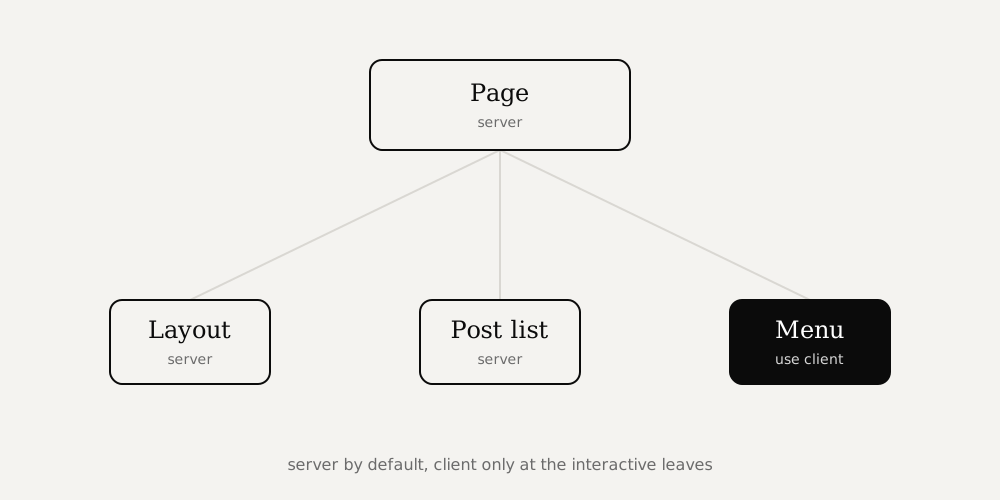
Keep server components as the default and push client components to the leaves of the tree, exactly where interactivity lives. A page can be a server component that fetches data and renders mostly static markup, with a small client component for the one piece that needs to be interactive, like a menu, a form, or a carousel.
// server component (default): fetches data, ships no JS
export default async function Page() {
  const posts = await getPosts();
  return <PostList posts={posts} />; // PostList can be server too
}
A useful trick: a client component can receive server rendered content as children. So you can wrap interactive behavior around static content without turning the whole subtree into client code.
Why it matters
Less JavaScript in the browser means faster loads and better responsiveness, which helps both users and Core Web Vitals. Data fetching on the server also removes waterfalls and keeps secrets off the client. The rule of thumb is simple: server by default, client when you truly need to react to the user.
Frequently asked questions
- What is the difference between server and client components?
- Server components render on the server and send HTML with no component JavaScript, and they can fetch data directly. Client components run in the browser and can use state, effects, and browser APIs, but they ship JavaScript.
- When should I use a client component?
- Use one only where you need interactivity: state, effects, event handlers, or browser APIs. Add the use client directive at that leaf of the tree and keep everything above it on the server.
- Are server components faster?
- Usually, because they send less JavaScript to the browser and can load data closer to the source. The win is smaller bundles and faster first render, especially on slower devices.